Get Paid, With Less Work
Silo Collections makes it easy for your customers to pay you—and even easier for your team to stay on top of receivables. With Silo, you can accept payments via credit/debit cards or ACH, automate reconciliation, and reduce time spent tracking payments and updating invoices.
How It Works
Silo streamlines the entire payment process from invoice to reconciliation. Here's how it works:
- Create and Send an Invoice
Generate professional, business-ready invoices directly within Silo. These invoices can be customized with PACA terms, footnotes, and other language specific to the way your business operates.
- Customer Pays Online
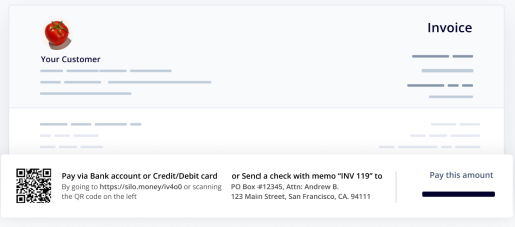
The customer can click the link in the invoice email or scan a QR code to access a secure payment portal. From there, they can pay using a bank account or a credit/debit card. Their payment method is securely saved for future use.
- You Get Notified & Paid
Once the payment is submitted, both you and your customer receive a confirmation email. ACH and card payments typically take 2–3 business days to fully process. After that, the funds are sent to your account; this payout can be reconciled in the Silo Settlement Report, which you can access in the Financial Reporting section.
- Invoices Are Automatically Marked as Paid
Payments automatically update your invoice records and AR aging reports. They also flow into your configured chart of accounts - eliminating manual reconciliation work.
Watch How It Works
English Version
Versión en Español
Fees

You can choose to pass the card fee on to your customer as a convenience fee. This is shown clearly during checkout.
How You’re Billed
At the end of each month, you will receive an invoice from Silo for any transaction fees related to Silo Pay. If a customer pays by credit or debit card and covers the fee themselves, those charges are deducted before disbursement and not included in your end-of-month invoice.
Why Use Silo Pay?
- Auto-Reconciliation
Payments are matched to invoices and marked as paid automatically - no more chasing down bank records or updating spreadsheets.
- Chart of Accounts Integration
All payments post into your chart of accounts and update your reporting dashboards, keeping your financials clean and current.
- Secure & Compliant
Silo uses industry-leading, encrypted payment processors. No sensitive card data is stored by Silo.
- Streamlined Payouts & Settlement Reports
You can receive automatic settlement emails showing exactly which payments are included in each payout, synced to your financial records.
How to Enroll
Getting started with Silo Pay is simple:
- Navigate to Finance > Silo Pay
- Connect your bank accounts for both Collections and BillPay.
- Configure your payment preferences, including:
- Whether to enable digital payment links on invoices and statements
- Signature preferences for check payments (if using BillPay)
Once bank accounts are connected, you’ll receive a secure payments application to verify your business and identity. This ensures we can compliantly process payments on your behalf.