Introduction
The Lot Details window is home to several performance metrics for a given lot. This guide is designed to help you understand how each value is calculated so that you can make more informed decisions.
Glossary
- Parent lot: This refers to the lot from which another lot was created.
- Repacks: This is the input lot that was used to create a repack. For example, if you converted a 10 lb box of carrots to 5 lb boxes, the 10 lb box would be considered the parent lot.
- Transfers: This refers to the lot that was transferred out of.
- Cascades: This refers to the actual lot of purchased inventory, not the cascaded item.
- Child lot: This refers to a lot that was created from another lot.
- Repacks: Using the same example above, the 5 lb box would be the child product.
- Transfers: This refers to the lot that was created as part of the transfer process.
-
Cascades: Cascaded product does not have its own lot number, so there isn't a child lot.
General Info

- Source: This is the PO, repack, or transfer that created the lot. You can click the link to view more information.
- Available to Sell Qty: This is the number of units left that have not been sold, wasted, returned, etc. and are still available to sell.
- RTS Qty: This is the number of units from the lot that was returned to your shipper (RTS).
-
Waste: This is the number of units from the lot that has been wasted.
Lot Expenses
This section of the Lot Details window shows the expenses associated directly with the lot (lot expenses) and the sum of all expenses associated with the lot family, including child repack or transfer lots that were created from this one (total expenses).
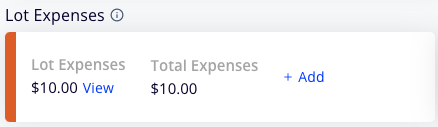
- Lot expenses: These represent this lot's share of expenses on the purchase order that created the lot, expenses on any sales orders made from the lot, and expenses connected to this lot directly. If the lot is a child lot from a repack or transfer, it will also include a proportional share of any expenses from its parent lot.
- For example, if a purchase lot included 60 units and had a connected expense of $100, and 15 units were used as input in a repack, the repack output lot's Lot Details screen would show $25 of the expense from the parent lot (15 units / 60 units x $100 = $25).
-
Total expenses: This includes both expenses associated with this lot directly and inherited expenses associated with child transfer and repack lots.
Lot Performance
This section conveys high-level financial metrics of how a given lot is performing. These numbers are all impacted by downstream lots meaning that sales, expenses, waste, and even additional repacks, and transfers from those lots will impact the original lot's performance metrics. It's also important to note that these numbers reflect only realized sales, meaning that inventory still on hand does not count against profitability.
For cascades and repacks, we translate units and dollars back into the parent lot equivalent. For example, if a cascade is 1 parent unit = 2 child units, and we sell 2 child units, we treat that as 1 unit sold when looking at the parent lot.

- Break-even/Unit: This represents the average break-even price point for all the units that have been sold from this lot (including units from downstream lots). The break-even price is the price at which a unit needs to be sold to cover the costs of purchasing that unit. It is comprised of the cost per unit from the PO and all associated expenses except those from sales orders.
- Qty Sold: Quantity sold directly from this and downstream lots. If the lot has connected repacks and/or cascades, it uses the parent quantity equivalent.
- Avg. Price/Unit: This is the average price per unit sold from this and downstream lots. This also includes units that have been marked as waste and treats them as $0 sales.
- Revenue Total: This is realized revenue from sales orders less credits.
- Gross Profit: Total revenue less cost of goods sold and wasted product.
- Cost of goods sold = [Cost per unit on PO] x [Total units], this does not include any expenses (PO, lot, transfer, and SO)
- Gross Profit Margin: Gross Profit / Total Revenue. Measured as a %
- Net Profit: Gross profit less total expenses. Unlike break-even/unit, this does include sales order expenses.
- Net Profit Margin: Net Profit / Total Revenue. Measured as a %
Impact of Repacks on Performance
- An example from a repacked lot where we took 50 units of a parent to create 100 units of a child.
- Child lot:

- 100 units sold at an average price of $5.00 per unit.
- Break-even/unit of a child is $3.00/unit since the parent is $6.00/unit and we create 2 child units per parent unit.
- Parent lot:

- Units sold = 50 (100 units of child = 50 units of parent, 2:1 ratio)
- Avg. Price/unit = $10.00 ($5.00/unit of a child = $10.00/unit of a parent)
- All revenue and profit of the child are also measured at the parent level.
-
Total revenue, gross and net profit and margin are all the same since there are no sales attached to the parent.
- Child lot:
Lot Sales
This section is a summary of all sales directly from the lot including cascaded products but does not include sales from repacked or transferred lots. The performance metrics (profit, margin, etc) listed here are specific to a specific sale and not the entire lot.
Cascaded product sales are translated to the parent lot's equivalent quantity. For example, if the cascaded product is half the size of a parent unit, a 10-unit sale of the cascaded product would be listed as 5 units.

Transferred Lots
This section is a performance summary of parent and transferred lots and their respective performance. Performance metrics for the parent lot are just sales directly from that lot and cascades, it does not include sales from repacks or transfers. Similar to the lot performance calculations, these values only include realized sales and waste.

- Received: Units received from the parent lot via transfer
- OH: How many units are physically on hand
-
Expenses: This is the total expenses tied to this lot, this includes downstream expenses to the transferred lot.
Repacked Lots
This section is a performance summary of repacked lots and also allows you to undo a repack. Like the lot performance of the parent lot and transferred lots, it is performance data for realized sales and waste of that lot. Unlike lot sales, these numbers are defined in the output lot units, it is not translated back to the parent lot equivalent.

- Repack ratio: This is the number of output units created per unit of input lot. For example, if it takes one input unit to create two output units, this number would be 2.00.
- Mathematically is defined as [Output Units]/[Input Units]