Bank reconciliation is the process of making sure the transactions on your bank statement exactly match the transactions in Silo for a given period. The goal for a user is to mark all the appropriate transactions in Silo as reconciled, which should match the balance that appears on their bank statement.
Reconciliation Scenarios
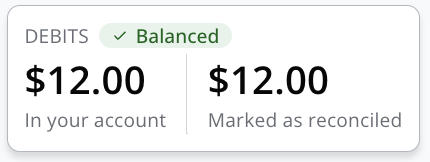
- When a user has marked the correct amounts of transactions in Silo as reconciled, the reconciliation entry will appear balanced.
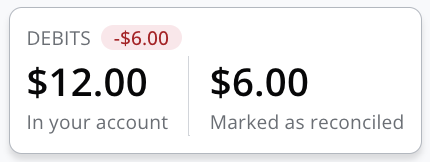
- When a user has marked transactions as reconciled, but they are lower than the total on the bank statement ($12, in this case), Silo will display the difference between the two values. In the example below, there are $6 worth of payments that haven’t been marked as reconciled. The user needs to figure out which payments they should have marked as reconciled that they missed.
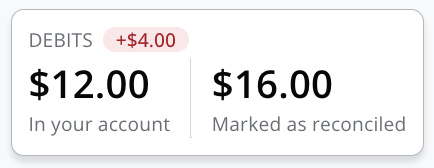
- When a user has marked transactions as reconciled, but they are greater than the total on the bank statement ($12, in this case), Silo will display the difference between the two values. In the case below, there are $4 worth of payments that have been marked as reconciled that should not be. The user needs to figure out which payments they marked as reconciled that they should not have marked.
Troubleshooting Tips
- First, verify that the number written under Credits in Silo is actually what the bank considers to be credits; sometimes, banks flip the terminology.
- For example, money going into a bank account in Silo is a debit, but some banks will consider these as credits. Verify whether credits on the bank statement are credits in Silo, and proceed accordingly moving forward.
- For example, money going into a bank account in Silo is a debit, but some banks will consider these as credits. Verify whether credits on the bank statement are credits in Silo, and proceed accordingly moving forward.
- Often the reason a user may be long or short on a reconciliation is due to transactions that are at the beginning or end of the reconciliation period, and these are the transactions that should be first double-checked by the user.
- For example, any check payments that were created on 8/31 probably should be reconciled within the September entry when the checks were actually deposited, but users may have accidentally reconciled those transactions within an 8/1–8/31 entry, leading to missing transactions in a September entry.
- For example, any check payments that were created on 8/31 probably should be reconciled within the September entry when the checks were actually deposited, but users may have accidentally reconciled those transactions within an 8/1–8/31 entry, leading to missing transactions in a September entry.
- Users can find transactions by leveraging the following tools
- Search field in the Reconciliation Entry window
- Reconciled/Unreconciled filters in the Reconciliation Entry window
- Method filter in the Reconciliation Entry window
- “Reconciled" column and filter in Sales > Payments and Expenses > Payments
- "Reconciled" column in general detail and specific account ledgers (Finance > Ledgers)
- If a user cannot figure out which transactions are causing an entry to not match their bank totals, a user can delete the entry and create a new one, starting over. On subsequent entries, a user could choose to create an entry for each week of a period instead of a full month, to zero in on where the mistaken transactions are getting selected or missed.