If you're looking for a specific payment within Silo, take the following steps:
- Navigate to Finance > Expenses > Payments (if you are looking for a payment you made to a vendor) or Finance > Sales > Payments (if you are looking for a payment a customer made to you)
-
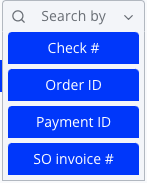
Press the Search by button to see a list of identifiers you can use to search
-
Select the identifier you'd like to search by—this will open a field for you to enter a search string

- Enter the ID or other identifier of the payment you are searching for. If you don't see any values, confirm you've entered the value correctly—only exact matches will be shown.