If you'd like a document (such as an invoice) automatically emailed to your customer when you place a sales order, follow these steps:
- Navigate to Orders > Sales Orders > New Order
- Select a customer, add items, and fill in any other relevant information
- When the order is ready to be placed, confirm that the Email checkbox in the footer is selected, and use the Customize link to choose which document to send and the contacts who should receive it
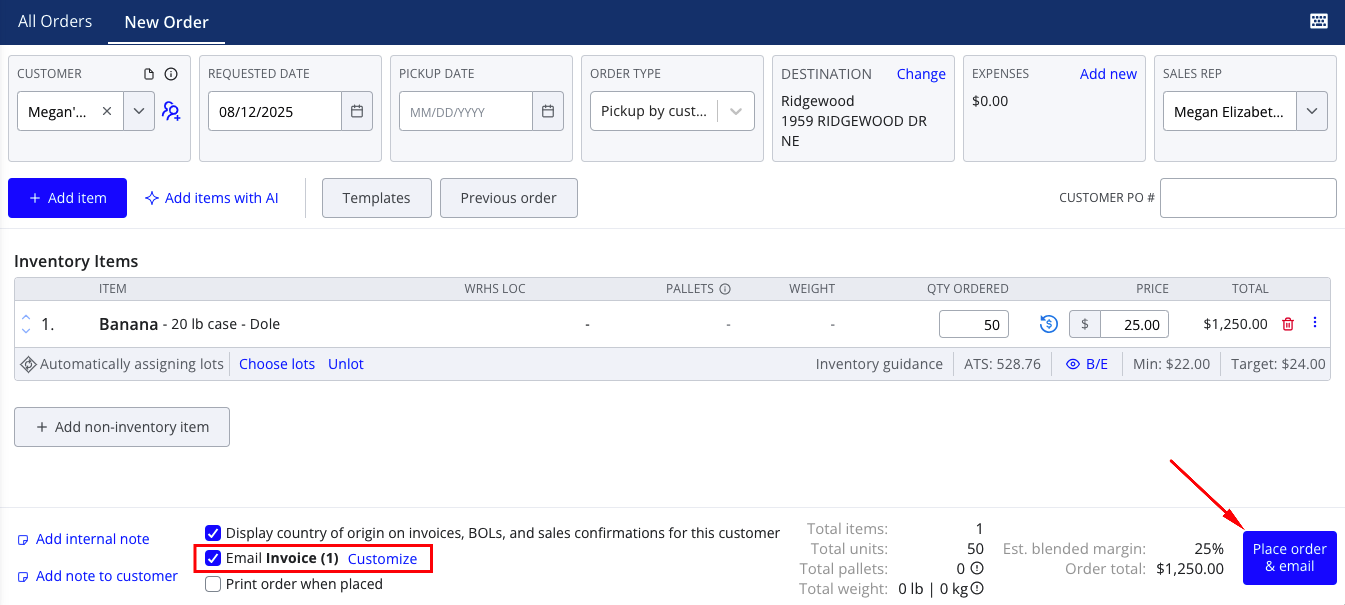
- Press Place order & email to finish placing the order and sending emails to any selected contacts
Note that your selection to send emails and which document you sent will be remembered as user settings. That means the next time you start a new sales order, the Email checkbox will be selected by default and set to your last selected document type.