Introduction
Silo now allows you to paste orders from emails, texts, or WhatsApp directly into Silo and automatically finds the correct items to add to your order, allowing you to skip the step of adding items one by one.
Silo utilizes AI to match the submitted text with your inventory and will automatically add the order items and quantity ordered to your sales order. You will still be able to edit the order as needed before submitting it, including replacing any items that were adding incorrectly. The model will learn from these corrections, and over time you should see fewer errors.
How does it work?
Once AI SO intake is enabled for your account, you'll see a new Add items with AI button appear when you start a new SO.
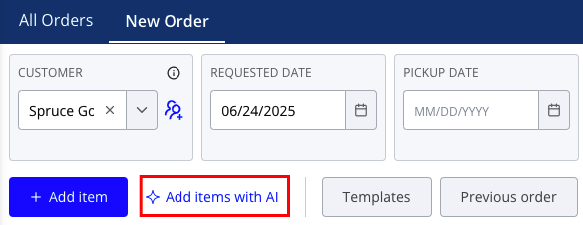
Pressing this button opens a window where you can paste in text from another source like email or WhatsApp.
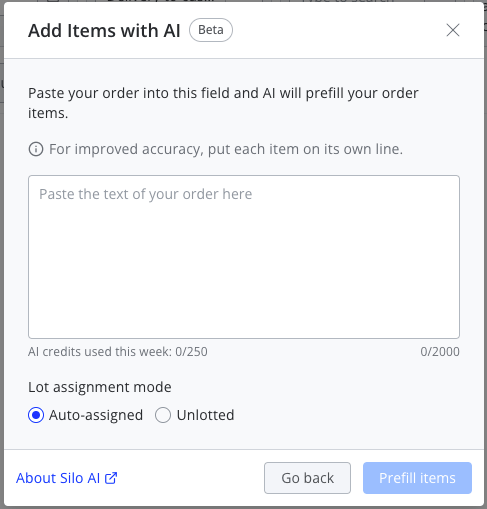
You can enter up to 2,000 characters in the text box. You're welcome to add items using AI to the same order multiple times, so if your order is longer than that you can split the text into multiple parts. For best results, make sure each item is listed on its own line.
After you press Prefill items, you'll see the items that you entered automatically populated on the order. High-confidence matches will display like any other order item. Medium-confidence matches will display with a yellow background. Items that could not be matched will display with a red background and must be corrected before the order can be placed. All items added by AI will have an edit icon to the right of the item information that allows you to swap it for the correct item if there was a mistake.
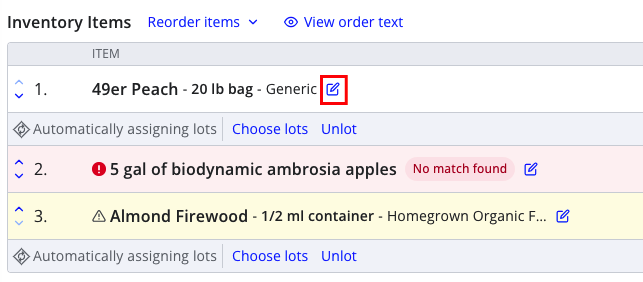
This opens a window that is similar to the standard item search, but with the originally entered text and the item currently on the order shown for reference.

Once you've corrected any items no match or an incorrect match, you can finish creating the order as usual by pressing Place order.
FAQs
What data are you using?
Silo's AI model matches the inputted text with your recent lots, recent sales orders, and any previous item corrections for the selected customer.
How do I get more credits?
Contact your CSM or customer support for pricing information.
How does Silo choose the price for order items added via AI?
Adding items with AI uses the same pricing logic as adding items from the omnibar, based on your account settings. See Choose prepopulated price when adding new items to a sales order in Settings > Orders for more information about how this is currently configured for your account.