When a user repacks inventory, Silo performs calculations in the background to ensure that:
- Costs and expenses for the output lots are correctly calculated based on the costs and expenses of the input lots.
- Output lot revenue, expenses, and inventory quantities (waste, O/H, sold, etc.) are correctly incorporated into performance calculations for the input lots.
This article explains how these calculations work.
Distribution MethodsThere are two ways to distribute a repack: by unit and by weight. In short, distributing by unit means that every unit of every item is treated equally. For example, if your repack outputs are boxes of apples and bags of apples, these will each have the same cost per unit, even though the items are different.
When distributing by weight, the cost, expenses, and revenue each input and output lot receives is based on the weight of each item. For example, an output lot of 10 lb bags of apples will cost twice as much as an output lot of 5 lb bags of apples.
Distribute by UnitInput Lots > Output Lots
When creating output lots, we need to ensure the cost and expenses are correctly calculated from the cost and expenses of the input lots. To do this, we calculate the per cent of total cost and expenses each output lot will inherit from the input lots by looking at the output's share of units over the total number of output units created.
Example Scenario
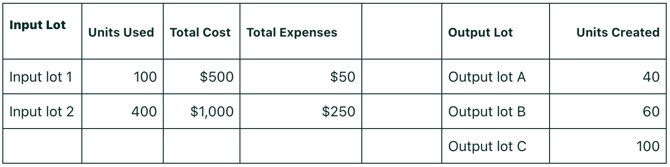
A repack is created with the following inputs:
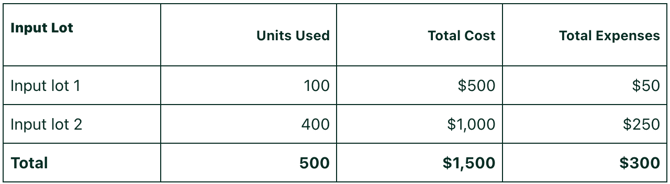
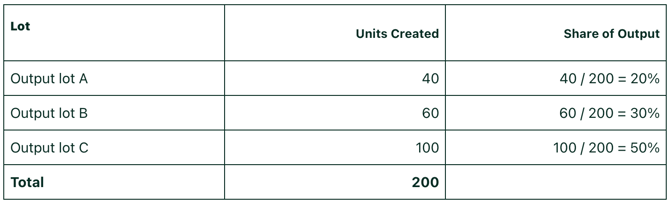
To calculate the per cent share for each output lot, divide the number of units in the output lot by the total number of output units.
To calculate the total cost and total expenses for each output lot, multiply the total input cost and total input expenses by the output lot share. Cost/unit and expenses/unit can be calculated by dividing the total by the number of units in the output lot.
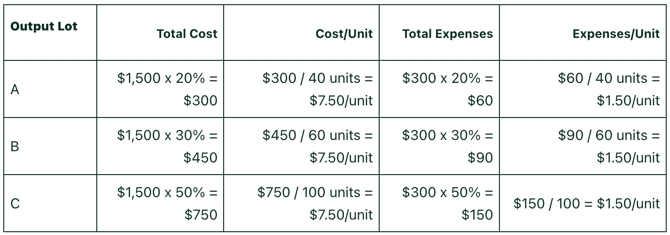
As you can see, each lot gets the same cost per unit and expenses per unit regardless of how many units are created in each lot.
Output Lots > Input Lots
Just as input cost and expenses flow to the output lots proportionally, output revenue and expenses roll up to each input lot's overall performance. This ensures that lot performance calculations across the platform are correct.
Example Scenario
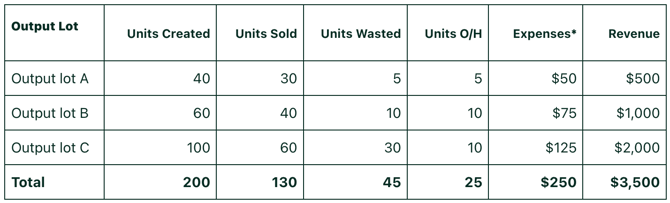
Consider the same inputs and outputs from the example above:
The output lots in this example have some revenue, waste, and additional expenses.
*These are expenses associated directly with the output lot (like an expense connected to a sales order where the output lot was sold), not expenses inherited from the input lots.
To calculate how revenue and expenses are distributed back to the input lots, first, calculate the share of each input by dividing the number of input lot units by the total number of input units.
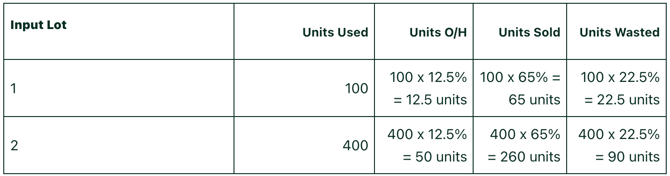
To calculate how the output expenses and revenue are distributed across input lots, multiply the total by each input lot's percent share. This ensures the right proportion of expenses and revenue is reported back to each input lot so that your liquidation reports and lot performance metrics are accurate.

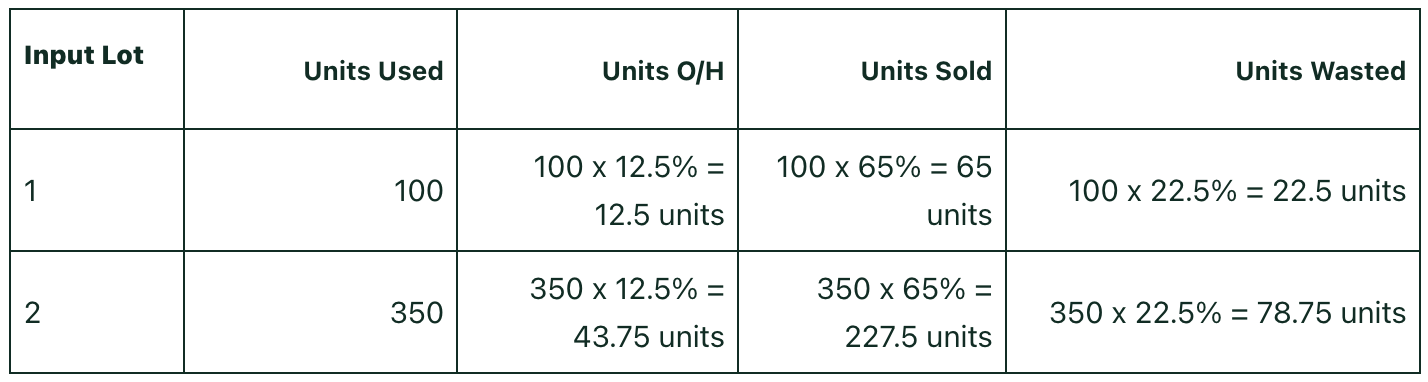
For units O/H, sold, and wasted, divide each category total by the total number of output units to get a percentage.
- Units O/H: 25 / 200 = 12.5%
- Units sold: 130 / 200 = 65%
- Units wasted: 45 / 200 = 22.5%
Then, multiply the number of input lot units used by the percentage shares for each input lot.
Distribute by Weight
Input Lots > Output Lots
When creating output lots, we need to ensure the cost and expenses are correctly calculated from the cost and expenses of the input lots. To do this, we calculate the percent of total cost and expenses that each output lot will inherit from the input lots by looking at the output's share of weight over the total output weight created.
Example Scenario
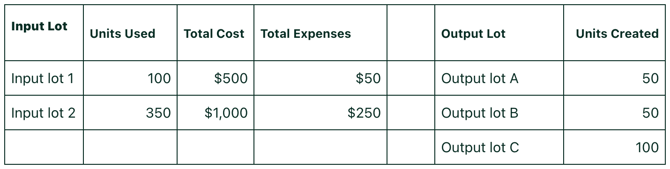
A repack is created from the following inputs:
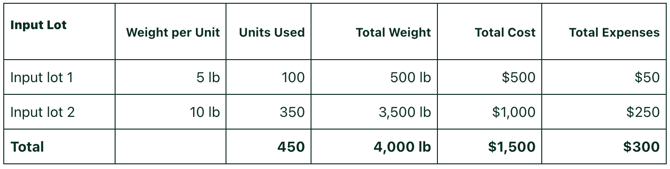
To calculate the percent share for each output lot, divide the weight of each output lot by the total output weight.
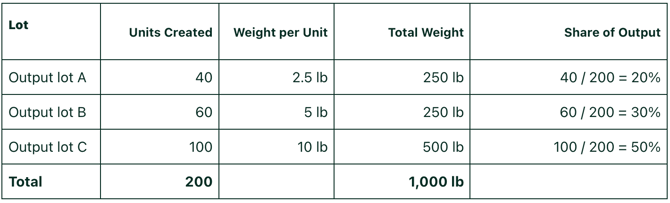
To calculate the total cost and total expenses for each output lot, multiply the total input cost and total input expenses by the output lot share. Cost/unit and expenses/unit can be calculated by dividing the total by the number of units in the output lot.
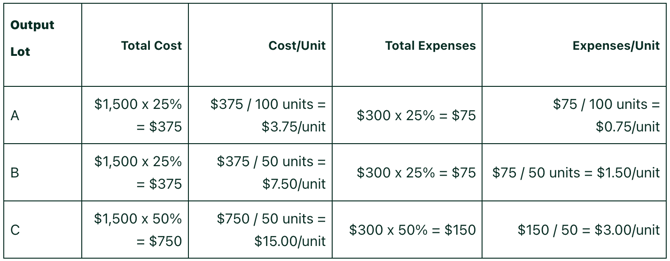
Output Lots > Input Lots
Just as input cost and expenses flow to the output lots proportionally, output revenue and expenses roll up to each input lot's overall performance. This ensures that lot performance calculations across the platform are correct.
Example Scenario
Consider the same inputs and outputs from the example above:
The output lots in this example have some revenue, waste, and additional expenses.
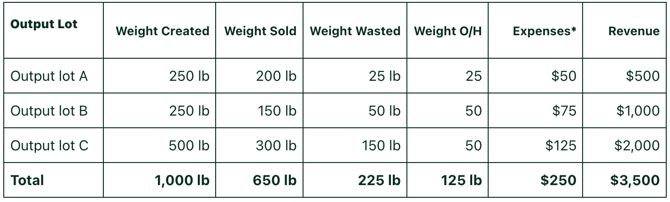
*These are expenses associated directly with the output lot (like an expense connected to a sales order where the output lot was sold), not expenses inherited from the input lots.
To calculate how revenue and expenses are distributed back to the input lots, first, calculate the share of each input by dividing the weight of each input lot by the total input weight.
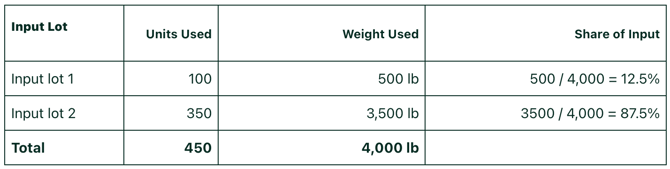
To calculate how the output expenses and revenue are distributed across input lots, multiply the total by each input lot's percent share. This ensures the right proportion of expenses and revenue is reported back to each input lot so that your liquidation reports and lot performance metrics are accurate.

For units O/H, sold, and wasted, divide each category total by the total output weight to get a percentage.
- Units O/H: 125 / 1,000 = 12.5%
- Units sold: 650 / 1,000 = 65%
- Units wasted: 225 / 1,000 = 22.5%
Then, multiply the input lot units used by the percentage shares for each input lot.