Some businesses go through the process of "closing their books" in order to uphold the integrity of their financial data. This process can be done on a monthly, quarterly, or yearly cadence, depending on the business, and is done for various reasons such as taxation and financial reporting. This process typically involves the bookkeeper or controller going through each transaction in a given period and validating that what’s documented in Silo correctly reflects what actually took place. Once this is done, financial reports can be generated and that period is considered “locked”. In the event that changes are required, they must be executed by a designated employee who possesses the necessary editing permissions.
In Silo, the account owner can set a close date by navigating to Settings > Accounting and pressing Set close date under the Financial Period heading.
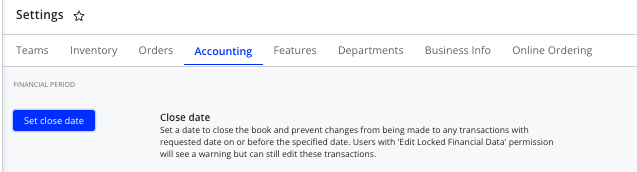
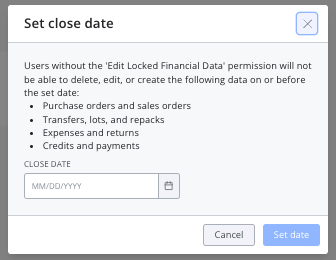
Once a close date is set, any transactions in Silo from on or before that date are considered "locked". This includes POs, SOs, lots, transfers, repacks, expenses, payments, accounts, and journal entries. To give users permission to edit these transactions, navigate to Settings > Teams, press Edit individual permissions for the desired user, and ensure that the Edit Locked Financial Data checkbox (at the bottom of the Accounting features section) is selected.
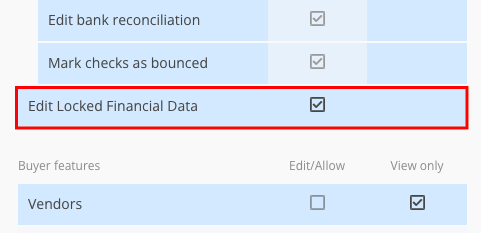
Users without that permission can view locked transactions, but will receive an error message if they attempt to save any changes to them.

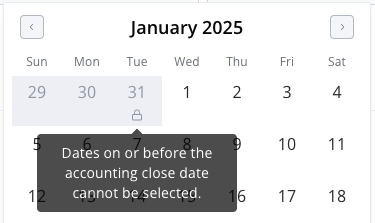
The close date will also be visible in date selectors across the platform, and users without permission will be unable to select any dates on or before the close date.
Note that all users can still take actions that don't impact any data related to accounting, such as printing documents, regardless of whether the transaction is locked.