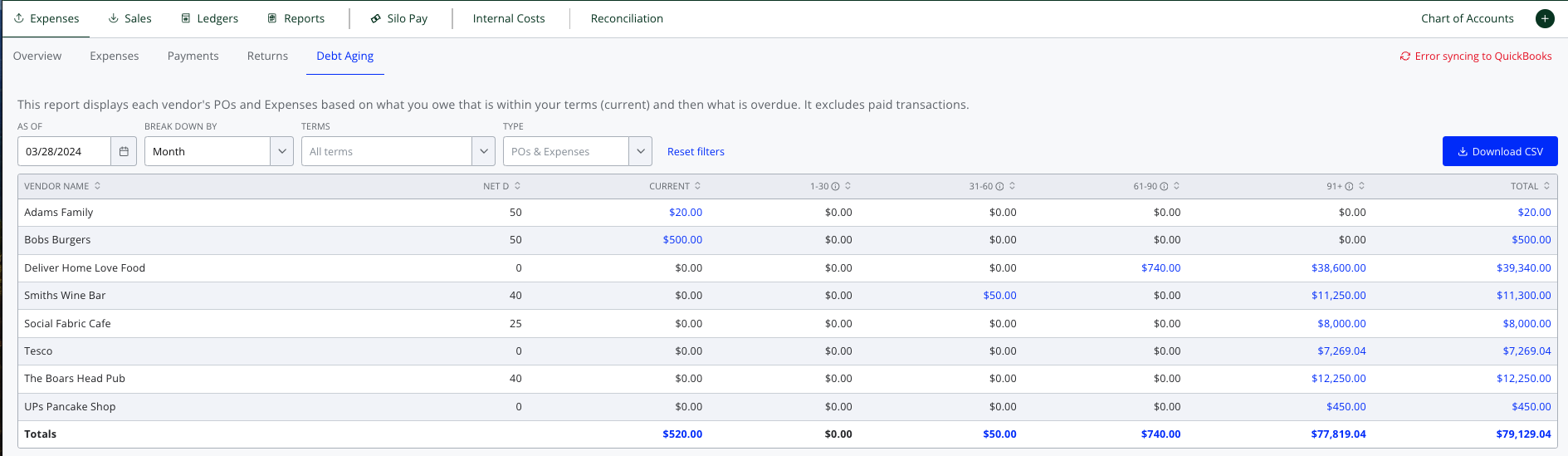
The Finance > Expenses > Debt Aging screen breaks down all the money your organization owes to its vendors. It shows the amount still within their terms (current), and then how much is overdue by different date ranges (e.g., 1-30 days, 31-60 days, etc.). Since it only reflects the outstanding balance due to each vendor, paid POs and expenses are excluded, as are unapplied payments and credits.
AP Debt Aging defaults to showing your debt aging as of today, but can be adjusted to show values as of any date. It can be broken down by week or month and filtered by vendor terms and transaction type (POs, expenses, or both). The data can also be exported to a CSV.
For additional context, each overdue amount is a link that will open the AP Expenses screen in a new tab filtered to show the expenses that are affecting the overdue balance that was clicked.